Optimizing Property Discovery

Optimizing Property Discovery

Optimizing Property Discovery

How Behavioral Map Redesign Increased Property Interactions By 60%

How Behavioral Map Redesign Increased Property Interactions By 60%

How Behavioral Map Redesign Increased Property Interactions By 60%

I redesigned how users browse, compare, and act on property listings inside the mobile map experience. The work focused on discovery friction, scan efficiency, and clearer exploration patterns, leading to a 60% increase in map interactions and a 35% boost in user satisfaction.

I redesigned how users browse, compare, and act on property listings inside the mobile map experience. The work focused on discovery friction, scan efficiency, and clearer exploration patterns, leading to a 60% increase in map interactions and a 35% boost in user satisfaction.

I redesigned how users browse, compare, and act on property listings inside the mobile map experience. The work focused on discovery friction, scan efficiency, and clearer exploration patterns, leading to a 60% increase in map interactions and a 35% boost in user satisfaction.

In partnership with:

My role

My role

Product designer

Timeline

Timeline

2 Months (8/2023)

Team

Team

6

The story behind

The story behind

The Spark That Started It All

The Spark That Started It All

How did it start?

How did it start?

How did it start?

When I joined DealApp as a Product Designer, in my first week there, my friend and manager, Mohammed Medhat, brought my attention to an urgent need to solve some critical issue in the app’s property browsing map. Both clients and agents were struggling with a clunky, outdated interface that made discovering properties frustrating and unintuitive.

Digging into the data, CTR, engagement metrics, and session recordings on Smartlook, it became clear: the map experience was broken. Users were bouncing almost immediately, showing signs of friction and low interaction. What should have been a key feature had become a dead zone. It was time to rethink the entire flow from the ground up.

When I joined DealApp as a Product Designer, in my first week there, my friend and manager, Mohammed Medhat, brought my attention to an urgent need to solve some critical issue in the app’s property browsing map. Both clients and agents were struggling with a clunky, outdated interface that made discovering properties frustrating and unintuitive.

Digging into the data, CTR, engagement metrics, and session recordings on Smartlook, it became clear: the map experience was broken. Users were bouncing almost immediately, showing signs of friction and low interaction. What should have been a key feature had become a dead zone. It was time to rethink the entire flow from the ground up.

When I joined DealApp as a Product Designer, in my first week there, my friend and manager, Mohammed Medhat, brought my attention to an urgent need to solve some critical issue in the app’s property browsing map. Both clients and agents were struggling with a clunky, outdated interface that made discovering properties frustrating and unintuitive.

Digging into the data, CTR, engagement metrics, and session recordings on Smartlook, it became clear: the map experience was broken. Users were bouncing almost immediately, showing signs of friction and low interaction. What should have been a key feature had become a dead zone. It was time to rethink the entire flow from the ground up.

Project summary

Project summary

A focused look at the problem, process, solution, and results.

A focused look at the problem, process, solution, and results.

Discovery Problem

Discovery Problem

Discovery Problem

DealApp’s map was supposed to support property discovery, but it had become a scan and navigation blocker. Home seekers and agents entered the map and quickly ran into stiff navigation, unclear filters, and a lack of guidance. Instead of helping users explore listings by location, the flow pushed them into a narrow path too early. Smartlook session recordings and in-app engagement metrics revealed a consistent pattern, high bounce rates, minimal interactions, and visible friction across sessions. The issue was not only visual age; the map was failing its discovery job.

Our solution

Our solution

Our solution

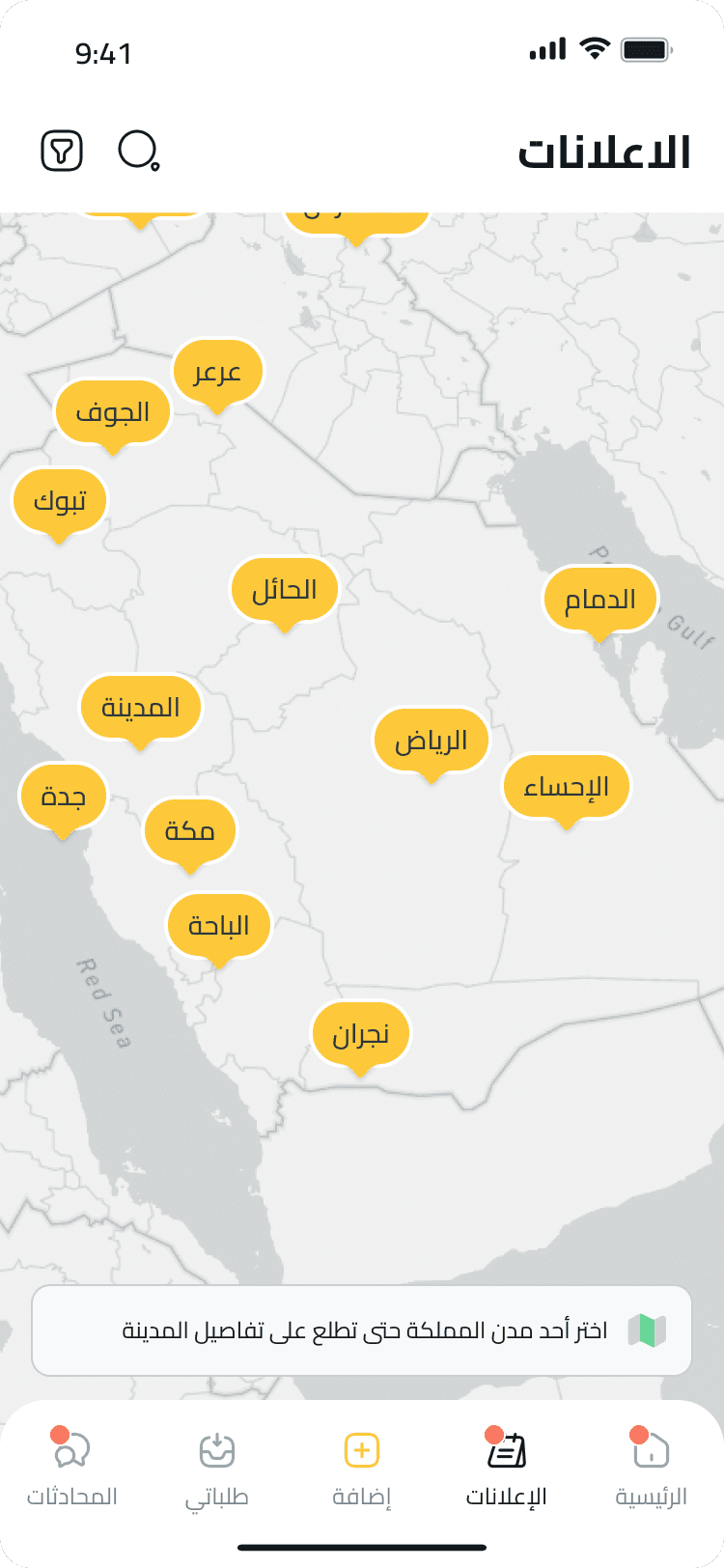
I replaced the static flow with a map-first discovery experience. Users can now zoom, pan, filter, compare listing types, and move between map and list views without losing context. The interaction model supports different discovery behaviors: browsing properties, reviewing requests, finding promoted listings, or locating agents across KSA.

Design Decisions

Design Decisions

Design Decisions

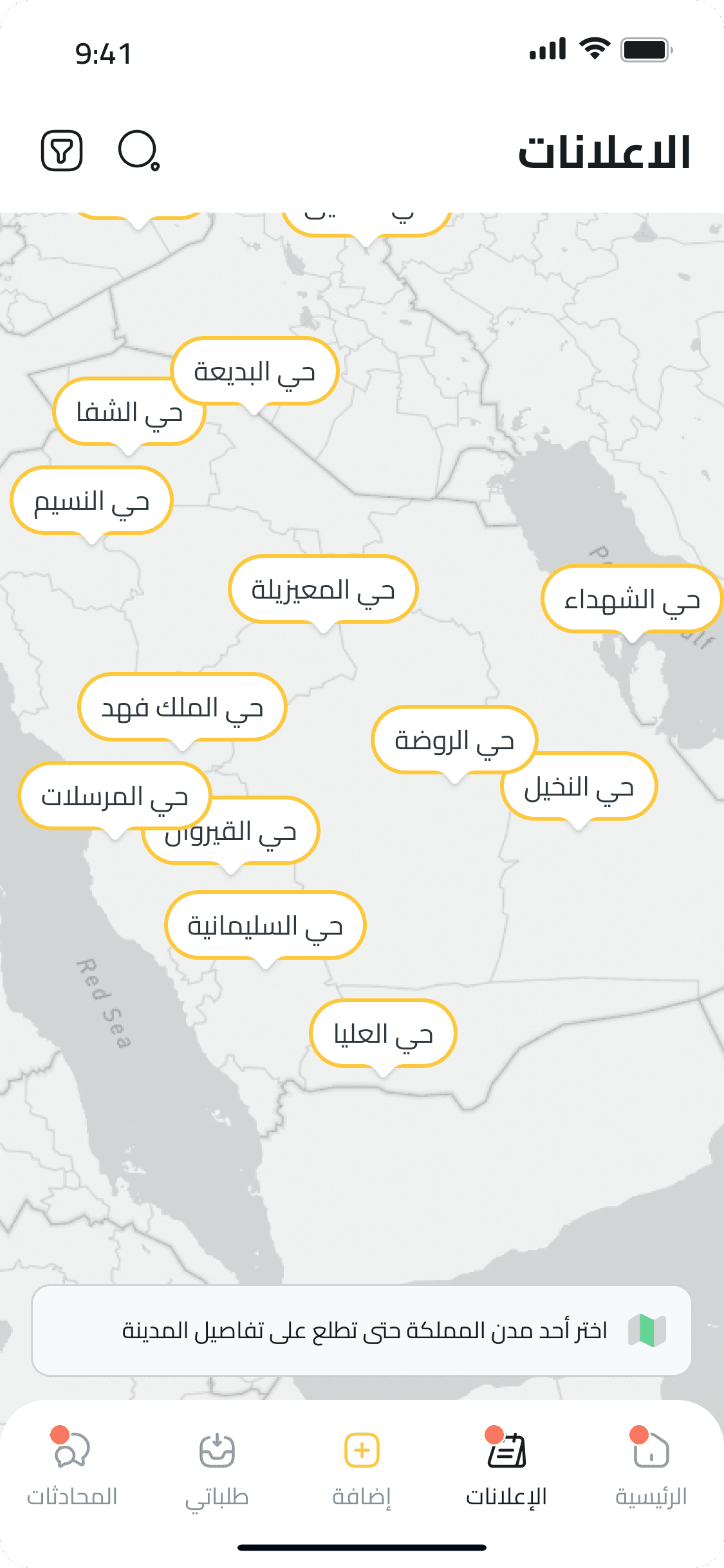
To kick off the redesign, I aligned with product and business teams to separate the different discovery behaviors behind the map. I mapped the browsing goals for clients and agents, then designed four map views: property ads by area, client-submitted requests, promoted listings, and agent locations. Each view reduced information overload by giving users a clearer category, a clearer next action, and an easier switch between spatial exploration and list-based comparison.

Previous Map Behavior

Previous Map Behavior

Previous Map Behavior

At the time, DealApp’s map feature displayed a non-interactive static map of Saudi cities. Users couldn’t zoom, scroll, or freely navigate the map. Instead, the flow was linear: tapping on a city pin opened a view of that city’s districts, and selecting a district would redirect to a property list view, with no map involved from that point on.

Design challenge

Design challenge

Design challenge

This wasn’t a minor UI tweak, it was a foundational UX problem dropped on my desk in my very first week at DealApp. The pressure was real. I had to quickly build context, think critically, and design solutions that didn’t just follow best practices, but made sense within users’ existing mental models. I ideated five distinct map exploration concepts, iterated fast, and aligned with stakeholders on the most promising direction. The challenge was not only about proposing a new interface, but securing buy-in for a completely new navigation logic that broke away from what users had been used to.

Discovery Value

Discovery Value

Discovery Value

Location-based browsing

Intuitive navigation experience

Personalized map views

Faster access to relevant results

Behavioral Outcomes

Behavioral Outcomes

Behavioral Outcomes

60%

60%

60%

Increase in map interactions

Increase in map interactions

Increase in map interactions

87%

87%

87%

Reduction in misclassified listings

Reduction in misclassified listings

Reduction in misclassified listings

35%

35%

35%

Boost in customer satisfaction

Boost in customer satisfaction

Boost in customer satisfaction

Tools & Practices

Tools & Practices

Blending design and product management, I led with vision and strategy, gaining confidence to explore, experiment, and learn fast.

Blending design and product management, I led with vision and strategy, gaining confidence to explore, experiment, and learn fast.

Blending design and product management, I led with vision and strategy, gaining confidence to explore, experiment, and learn fast.

Tools

Tools

To bring this redesign to life, I combined low-fi thinking with high-fi execution—balancing early sketching and ideation with collaborative design workflows. From aligning with teams to analyzing real user behavior, each tool played a key role in shaping a fast, insight-driven solution.

Notion

Figma

Pen & Paper

Zoom

Smartlook

Slack

Practices

Practices

The design approach blended user research with collaborative validation. We gathered input through interviews and surveys, analyzed behavior via session recordings, and tested early concepts to refine usability. Prioritization principles helped focus on what mattered most at each stage.

Stakeholder interviews

Surveys

User behavior recordings

Usability testing

Prioritization

Tools

To bring this redesign to life, I combined low-fi thinking with high-fi execution—balancing early sketching and ideation with collaborative design workflows. From aligning with teams to analyzing real user behavior, each tool played a key role in shaping a fast, insight-driven solution.

Notion

Figma

Pen & Paper

Zoom

Smartlook

Slack

Practices

The design approach blended user research with collaborative validation. We gathered input through interviews and surveys, analyzed behavior via session recordings, and tested early concepts to refine usability. Prioritization principles helped focus on what mattered most at each stage.

Stakeholder interviews

Surveys

User behavior recordings

Usability testing

Prioritization

Visuals

Visuals

Redesigning a core map feature from scratch, grounded in real user behavior and tight collaboration with the product team.

Redesigning a core map feature from scratch, grounded in real user behavior and tight collaboration with the product team.

Ads Map

Ads Map

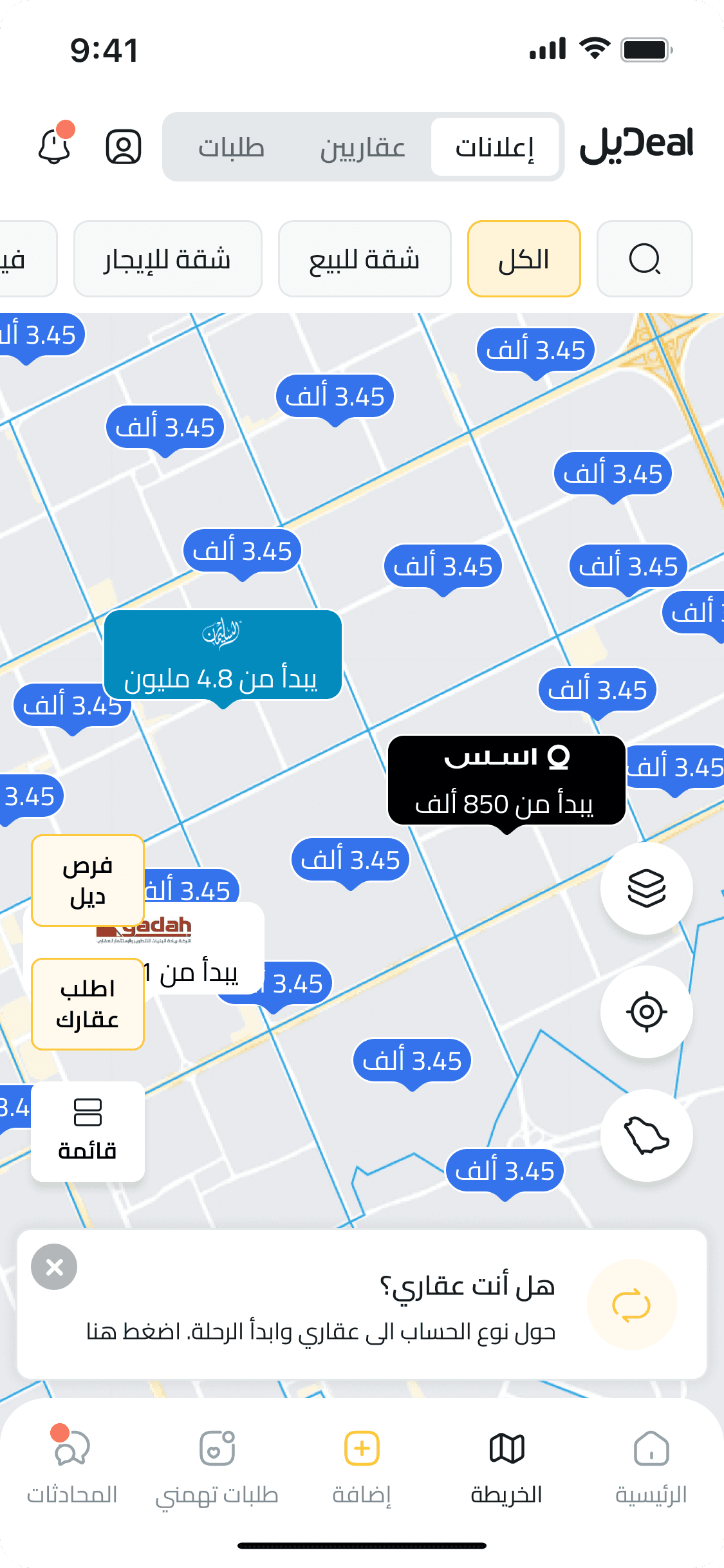
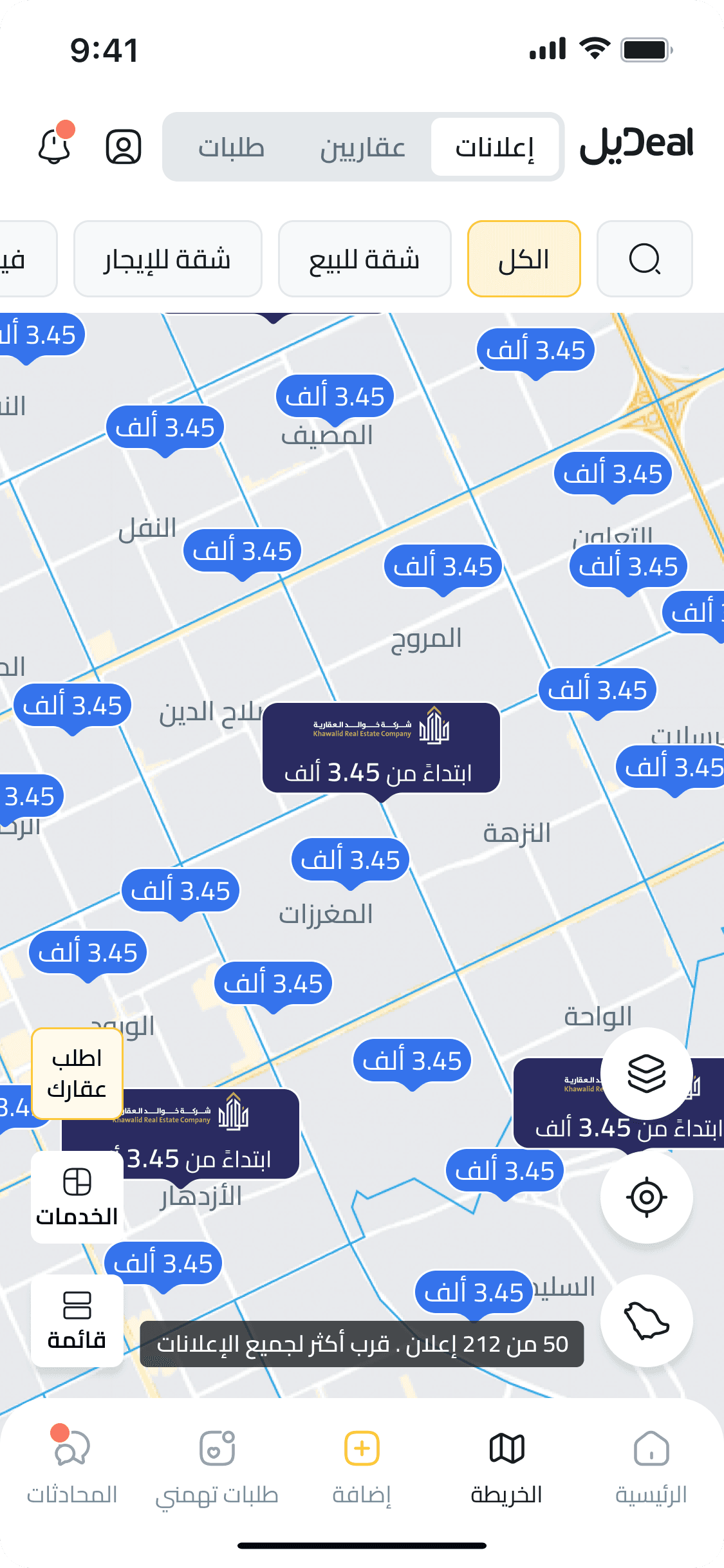
An interactive property map where users can browse real estate listings by price and location, filter results, and switch views instantly. Designed for fast, intuitive exploration, whether on desktop or on the go.

Requests Map

Requests Map

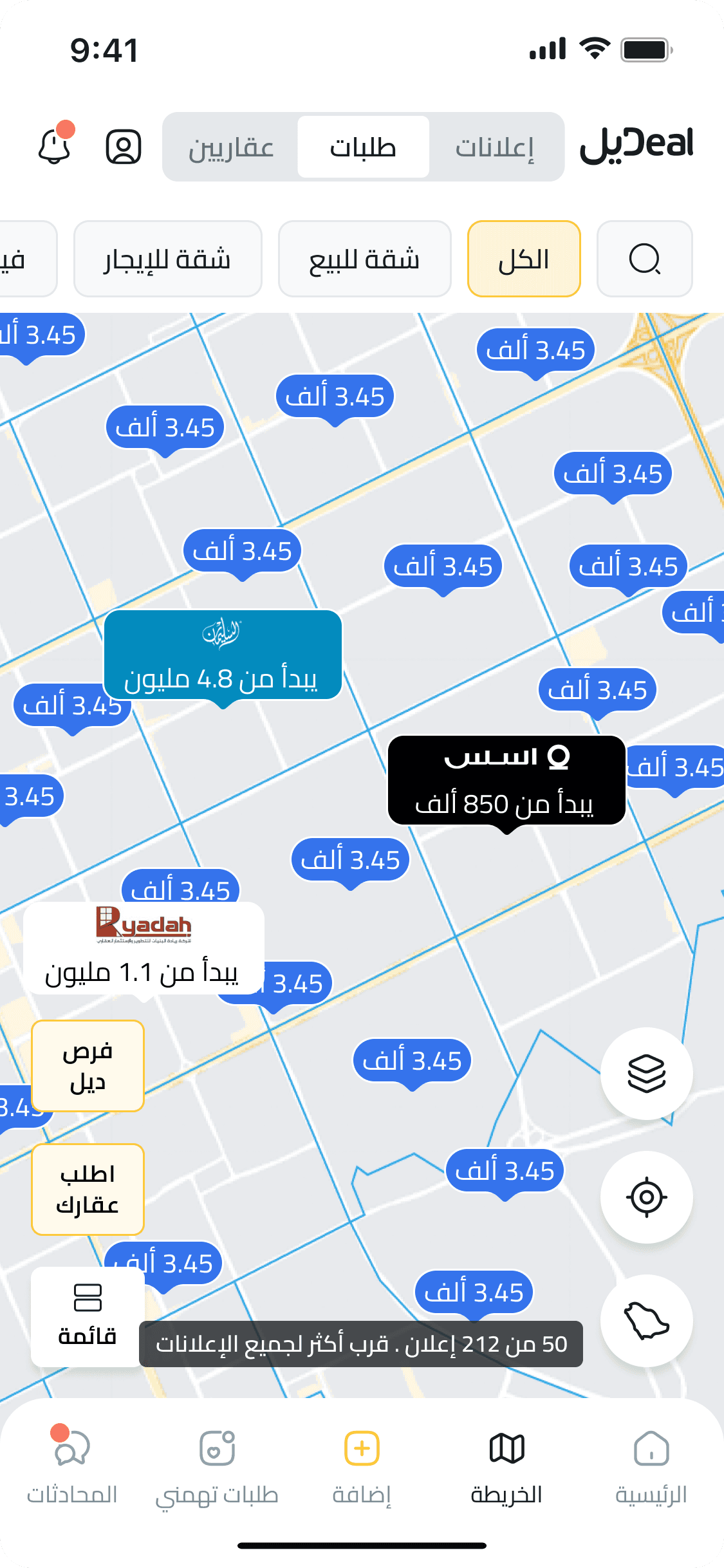
Displays live user property requests across the map, allowing agents to explore demand by area and respond to relevant opportunities nearby.

Ads Map

An interactive property map where users can browse real estate listings by price and location, filter results, and switch views instantly. Designed for fast, intuitive exploration, whether on desktop or on the go.

Requests Map

Displays live user property requests across the map, allowing agents to explore demand by area and respond to relevant opportunities nearby.

Agents Map

Agents Map

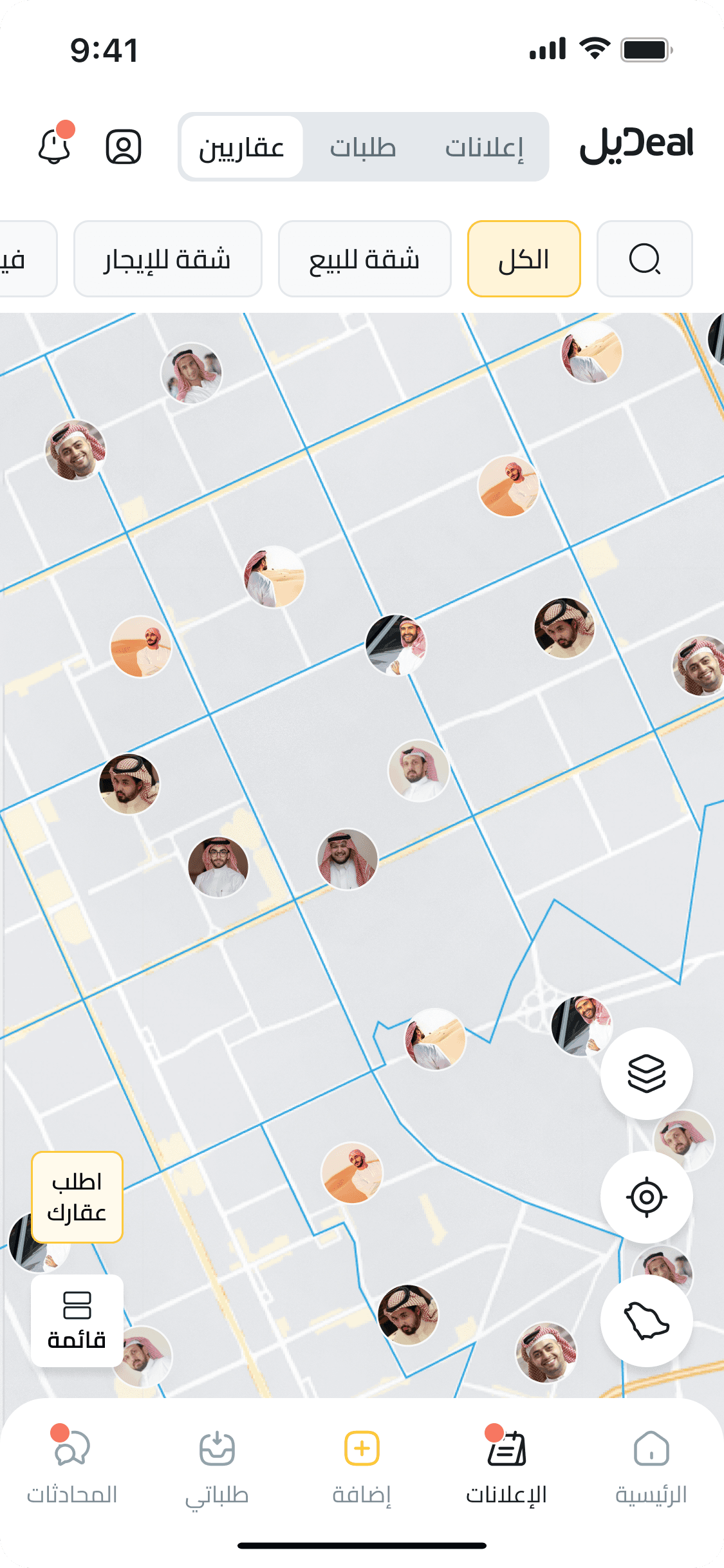
Shows active real estate agents by location, helping users find nearby professionals based on their area of interest.

Ad Preview

Ad Preview

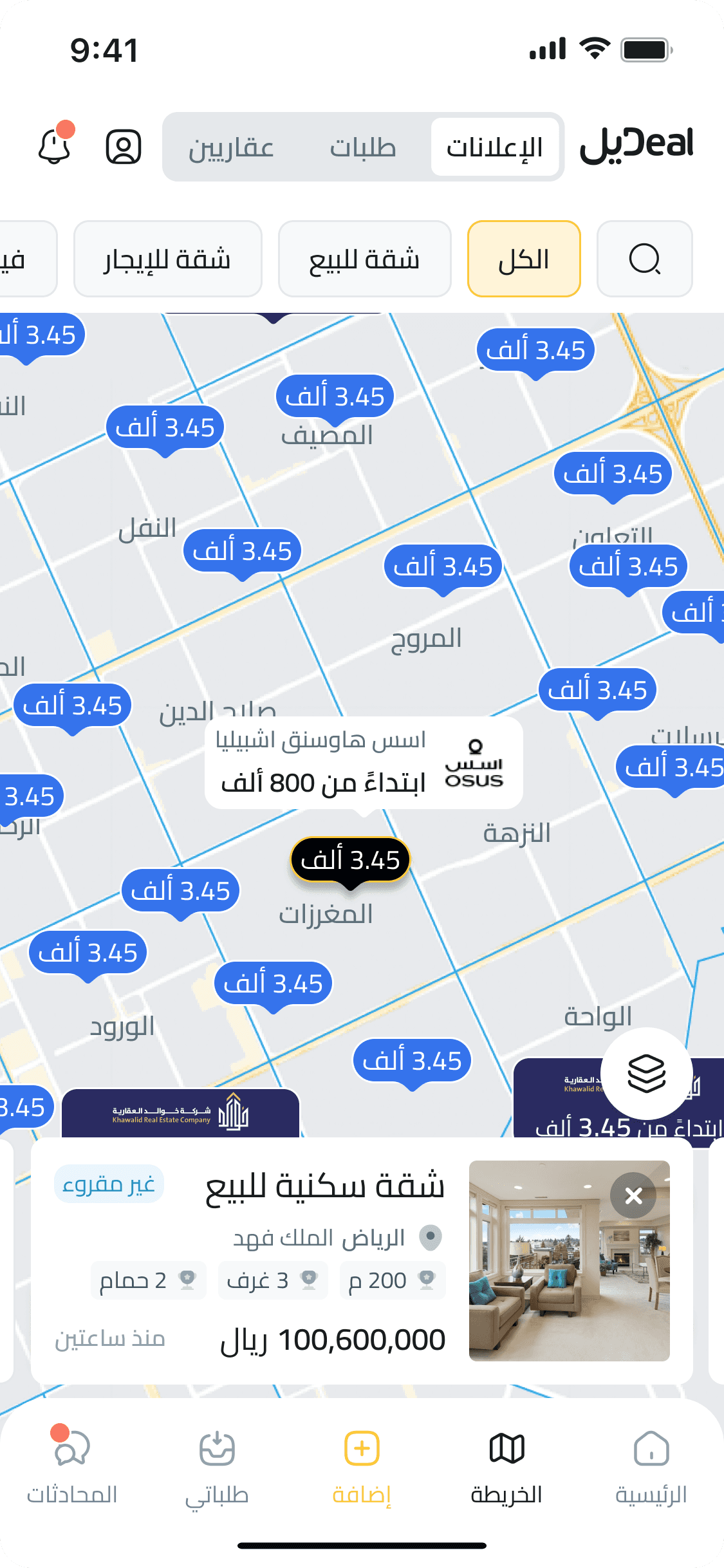
Tapping a pin reveals key property details in a quick-view card, letting users browse nearby listings without leaving the map. Pin states update as they swipe or explore, keeping navigation smooth and focused.

Agents Map

Shows active real estate agents by location, helping users find nearby professionals based on their area of interest.

Ad Preview

Tapping a pin reveals key property details in a quick-view card, letting users browse nearby listings without leaving the map. Pin states update as they swipe or explore, keeping navigation smooth and focused.

Ads List

Ads List

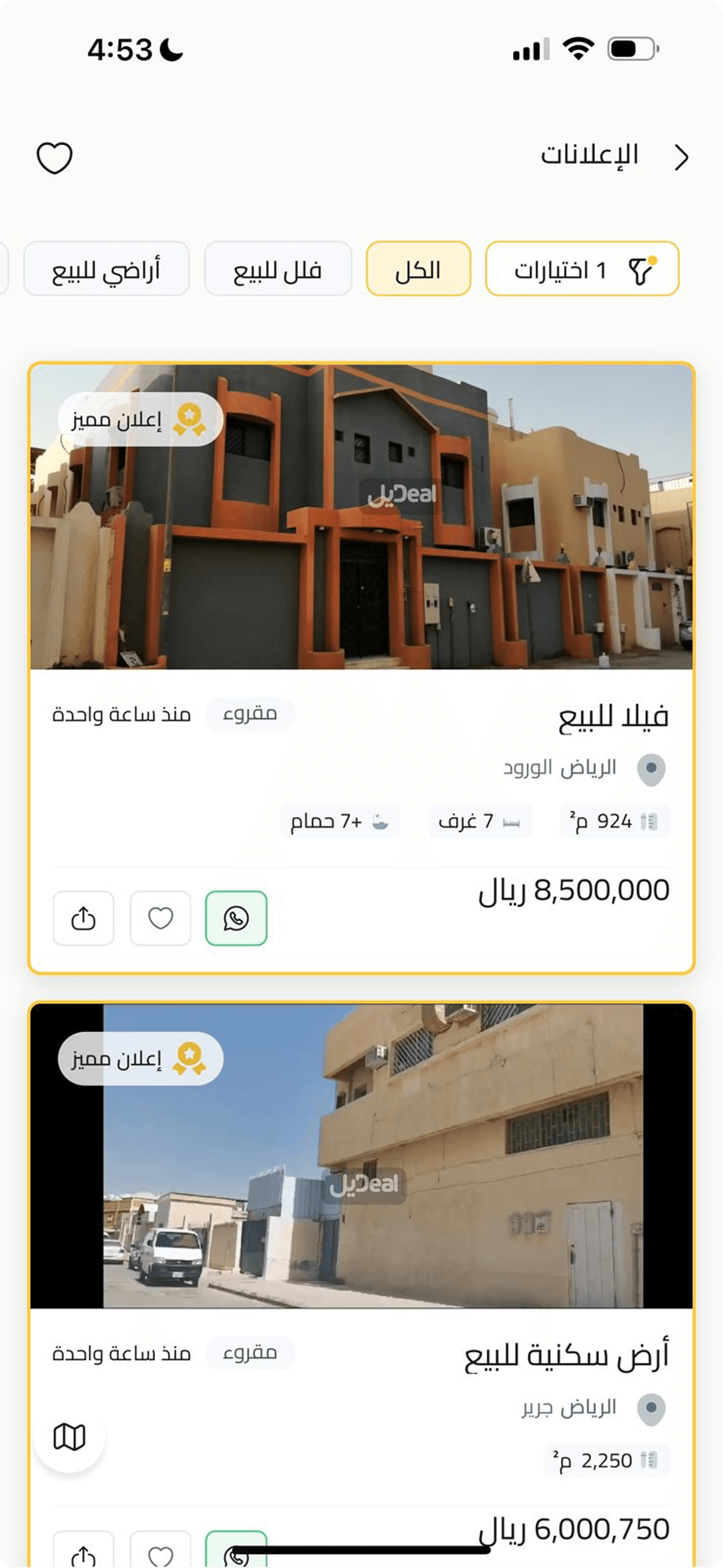
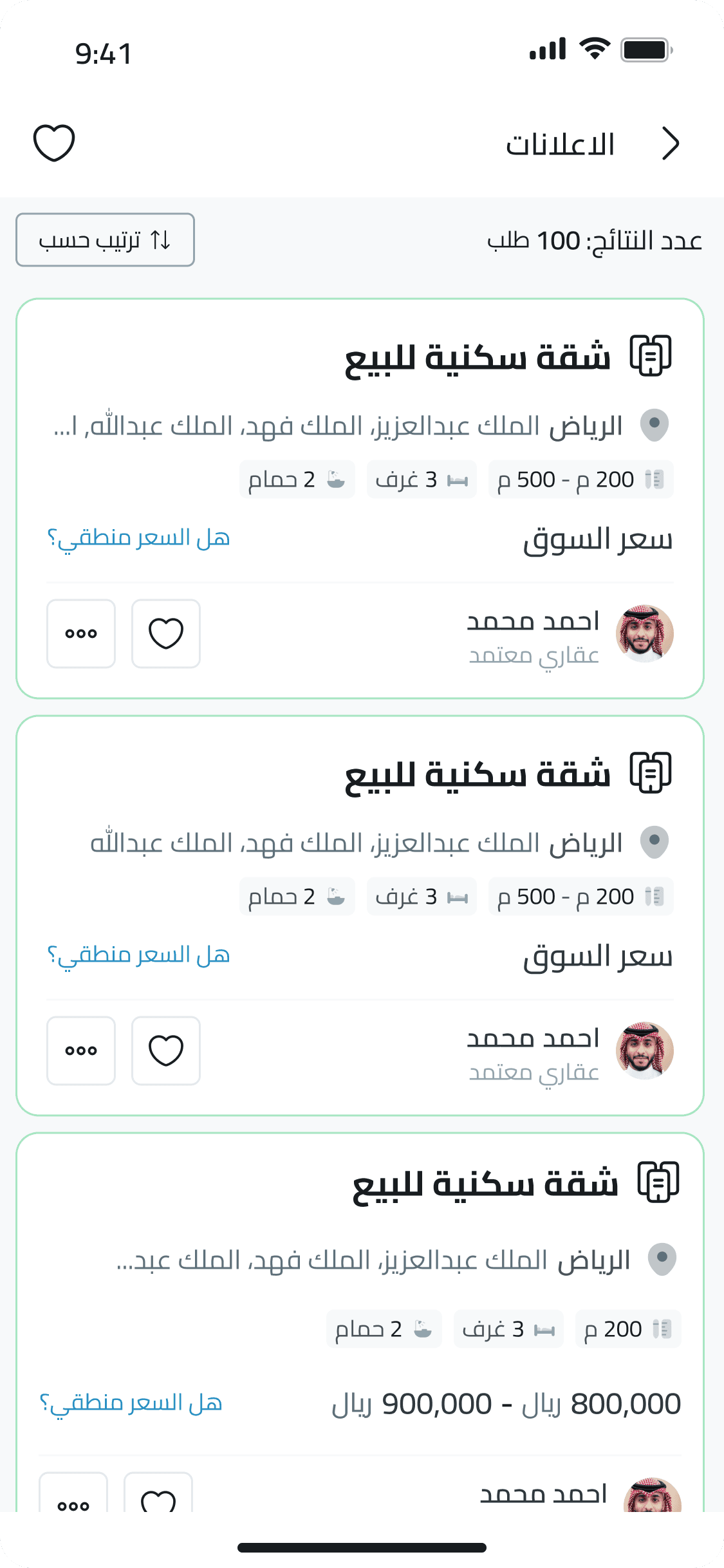
Accessible from the map via the “قائمة” button, this screen displays property ads in a scrollable list—perfect for users who prefer viewing details in a structured, card-based format with direct actions like sharing, saving, and WhatsApp contact.

Submit Request

Submit Request

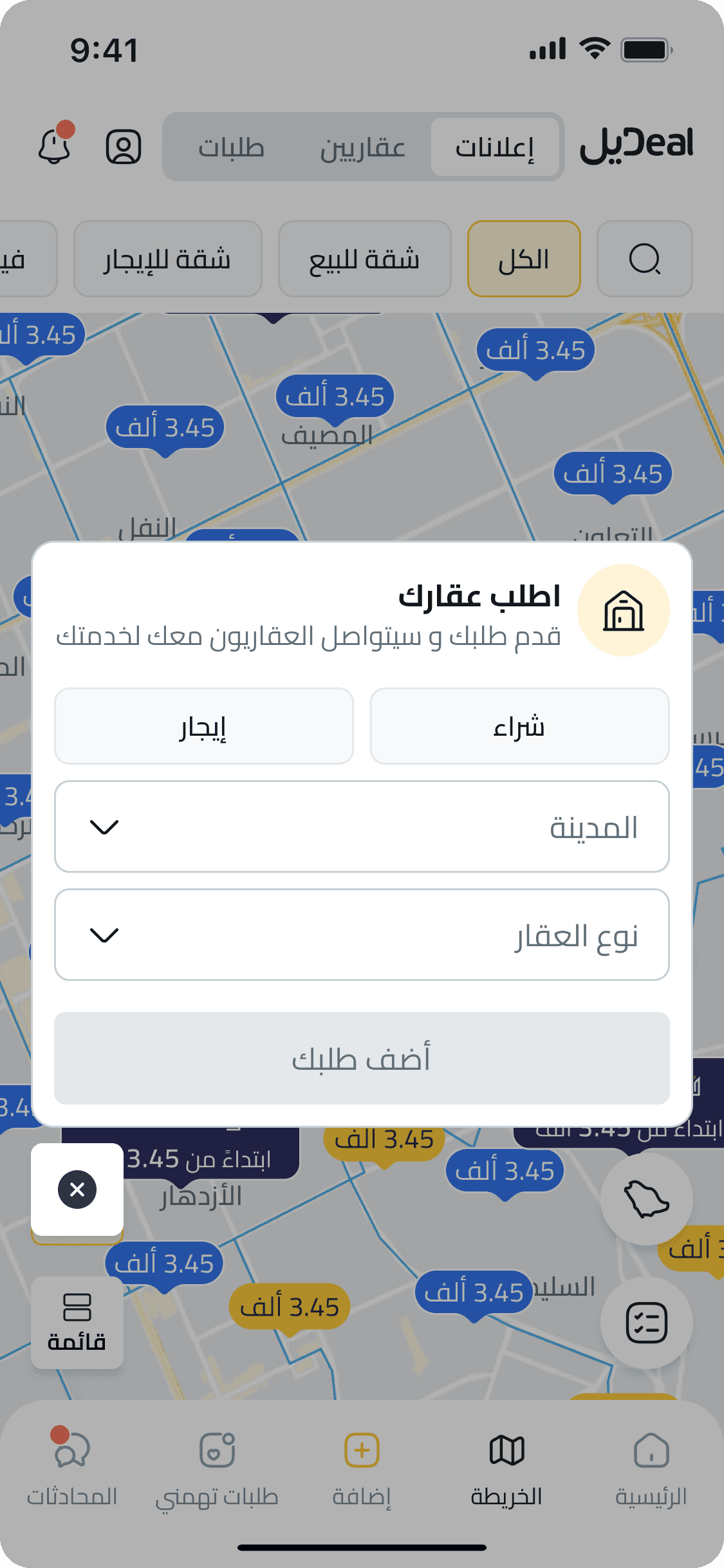
When users can’t find what they’re looking for, tapping “اطلب عقارك” opens a smart, in-context request form. It lets them submit their needs quickly—directly within the map—making the process faster, more intuitive, and increasing engagement by converting searchers into active clients.

Ads List

Accessible from the map via the “قائمة” button, this screen displays property ads in a scrollable list—perfect for users who prefer viewing details in a structured, card-based format with direct actions like sharing, saving, and WhatsApp contact.

Submit Request

When users can’t find what they’re looking for, tapping “اطلب عقارك” opens a smart, in-context request form. It lets them submit their needs quickly—directly within the map—making the process faster, more intuitive, and increasing engagement by converting searchers into active clients.

Learnings

Reflections, takeaways, and what I’d do differently.

Learnings

Reflections, takeaways, and what I’d do differently.

What did I learn?

What did I learn?

What did I learn?

Jumping into a high-impact flow during my first week pushed me to balance speed with structure. I learned to design around observed behavior, not only requested features: how users scan listings, move between map and list views, and recover when they cannot find the right property. It also taught me how to keep momentum without losing clarity.

What went well?

What went well?

What went well?

Cross-team alignment made the map redesign sharper. Product, business, and design conversations helped separate different discovery modes instead of forcing every user into one map behavior. Fast iteration gave us a clearer structure for property ads, requests, promoted listings, and agent discovery.
What could be improved?

What could be improved?

What could be improved?

Looking back, I would test the map behavior earlier with both home seekers and agents. I would also document interaction rules more clearly: how clusters behave, when users switch to list view, how filters persist, and how request submission should work when users do not find a matching property.

Looking back, I would test the map behavior earlier with both home seekers and agents. I would also document interaction rules more clearly: how clusters behave, when users switch to list view, how filters persist, and how request submission should work when users do not find a matching property.

Keep Exploring

Keep Exploring

More projects, more perspective—see what else is shaping the way I design.

More projects, more perspective—see what else is shaping the way I design.

More projects, more perspective—see what else is shaping the way I design.

Let's Connect

I work with ambitious teams and founders to build digital products that are genuinely useful, and that grow with the business.

Let’s Talk!

Let's Connect

I work with ambitious teams and founders to build digital products that are genuinely useful, and that grow with the business.

Let’s Talk!